
After writing the other day about how I’m getting older, it would seem I had it all wrong. I’m Benjamin Button-ing before my very eyes! It started innocently enough.
Google frightens me. That said, I do use it, first and foremost as a search tool that dramatically speeds up my research into the various things I write about. But I also use its tools to analyze the traffic on my website. And that’s where our story begins.
Yesterday, I logged into my Google “dashboard” to check a setting. It told me I had one email message waiting for me at Gmail. I do have a Gmail account/address, but I only use it for testing purposes and I never give it out. I have an Outlook Online (Microsoft) address for the same reason. These addresses are not linked to anything in a way like matt@taxpoodle.net automatically forwards to my private email address (because I can’t be bothered to check more than one inbox a day), so I was a bit surprised at first to find I had mail at Gmail; but in my experience these are usually internal emails related to some function or functioning of Google itself. As was the case with this one.
I practice pretty good digital hygiene. I have my bowser (Microsoft Edge) set to delete my history and purge my cache at the end of every session, have told the Microsoft account dashboard not to log my history, and I delete all stored cookies manually on average every thirty days (give or take a day). I use software to prevent web beacons from transmitting any information from my laptop. I begrudgingly have history enabled on YouTube (a Google service), because I ran into a snag where I couldn’t use the site unless I did, and I’m only watching British comedy panel shows, videos of dogs’ reactions when being adopted from animal shelters, and Convos with Buddy – a 7 year old talking Chihuahua who talks about everything from his love of pancakes to traveling abroad. Gordon and I generally watch these together. He is smitten with Buddy.
As I clicked over to Gmail I thought “this is going to be one of those ‘We’ve Updated our Terms & Conditions’ notices” none of us ever read or mindlessly click “Accept & Continue” on the pop-up just to get at whatever we’re looking for. I’m no different; I don’t read them, unless its Grubhub and it’s a “buy a 10-piece McNuggets before midnight and get a free Big Mac” offer to make sure I don’t have to add a Filet-O-Fish value meal. Who goes to McDonald’s for fish? Who goes anywhere for fish?
But it wasn’t. The inbox subject line was ominous: Google updated your settings. Oh really? What settings? So I clicked on it, and…
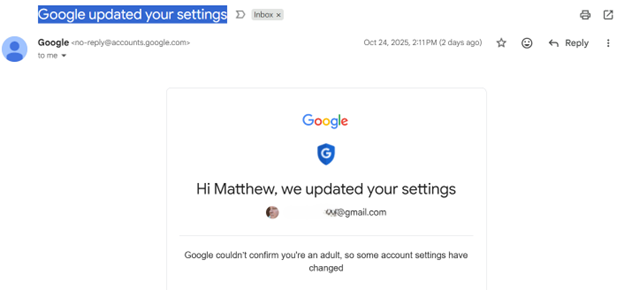
Wow! So effectively, I’ve been carded by Google! And they can’t (or won’t) confirm I am an adult. I dug a little deeper, by which I mean I used Google (a proper noun) to google (a verb) age-related account restrictions, and was told that “safe search” was on, “personalized ads” are off, they are not saving my “visits” (whatever those are) and “routes” (I assume this means “driving directions” in Maps), and that if this was all a big misunderstanding all I had to do was “prove” I am an adult using one of the methods they supply.
Hmm. I don’t particularly want ads, personalized or not, so no loss there, and saving my visits and routes seems a bit “big brother,” so no loss there. But I don’t like the sound of “safe” search, because who decides what is safe? So I decided to test it. First I searched for a website containing video entertainment for gay men who like being tied up and spanked with a flip-flop, and got…

Then I searched for a specific site I know the name of which also caters to gay men seeking video entertainment of an “exciting” nature, and I got a page full of results about an Australian football journalist and documentary filmmaker who had the regrettable misfortune to have the same surname as the website. What are the odds?
Now I don’t want to leave you with the impression that I frequent these kinds of sites. I do, but I don’t want to leave you with that impression. For me, the most troubling thing about this, aside from the remedial steps Google offers (which we’ll get to in a moment) is that one search term can produce two different results. I know the idea here is to keep young kids from the mind-numbing trauma of seeing a man draped over the knee of another man while having his exposed butt cheeks reddened by beach footwear. But all I had to do was sign out of my account and perform the same Google search – actually, I didn’t have to do anything!…once I signed out, the page full of links to the Australian football journalist refreshed and was replaced with new search results, my gay porn website which shared his surname right at the top! Another quick search and I was up to my buttocks in flip-flops.
I figured out that workaround in under five minutes, you don’t think some tech savvy kid (and they’re all tech savvy these days) will do the same? Just don’t log into your age-restricted account, or use your mom or dad’s account. It’s the new millennium equivalent of hiding porn magazines under your mattress!

Google offered me several different methods to “prove” to them I am an adult so that when I search for “Try My Nuts” they will show me a link to the family-run online snack shop from North Carolina selling a wide variety of nuts, candies, hot sauces, spiced peanuts, fudge, and more where I get my Butt Munch peanuts and my Dirty White Trash snack mix (crunchy pretzels, crisp cereals, and premium pecans, all coated in a luscious white chocolate confection and finished with a decadent drizzle of milk chocolate), and they won’t search-block me because I might be some randy garden-variety teenager looking for tea bagging websites.
One method of age verification is providing Google with a bank card number, which I presume they run a credit check against. I never allow websites to store that information or “save your details for faster checkout next time,” so that was a non-starter for me. Moreover, you don’t need to be 18 to have a bank card, so this is not about verifying anybody’s age. Also, just borrow your mom or dad’s card. Unless they catch you in the act, they’ll be none the wiser (as no charge or debit is made) and you’ll be downloading porn in no time and “enjoying” it in the privacy of your room (unless they catch you in the act!).
Another method to verify my age they offered is sending them a photo of my Id! So they would have not just my address and all my personal details (like height, weight, organ donor status), but a picture of me to go with it as well? Um, no. There was also a QR Code I could read with my phone which would then take a selfie of me and send it to them to be read by some facial recognition software that uses AI to determine how old you are. I think not.

While we’ve been busy keeping an eye out for signs that Orwell’s 1984 was coming to pass, Huxley’s Brave New World is casually creeping up on us unnoticed in the guise of the convenience and reach and ubiquity of Google.
So now what? Microsoft is always pestering me to set their search engine, Bing, as my default as I use their browser, Edge. Maybe someone should bring back “Ask Jeeves,” the search engine I used in the latter half of the 90s with its cartoon butler mascot named Jeeves, who was based on the fictional character from P.G. Wodehouse novels. English butlers are always discreet! And I’ve heard good things about DuckDuckGo, which reportedly does not create a personal data profile of its users, and suggests, “While Google may offer more sophisticated results for complex searches, DuckDuckGo is proficient for most everyday needs and actively blocks trackers to protect your information.”
Update 10/28/2025: After testing a few options, I determined the best solution, for me, was to switch my browser and my search engine. The key requirements for me are a seamless, integrated, and synchronized experience that is available on my Windows laptop and my Apple iPhone, and support for my two major extensions: Dashlane, which handles all logins and passwords, payment methods, and auto-fill (name, address, birthday, etc.) and Malwarebytes, which takes care of virus protection, blocks pop-ups and ads, and, as the name suggests, guards against malware being installed from less than trustworthy websites.
Mozilla Firefox is a free and open-source web browser developed by the Mozilla Foundation. It uses the Gecko rendering engine to display web pages, which implements current and anticipated web standards. It was easily downloadable and installed on both my laptop and mobile platforms, gave me the ability to import bookmarks from Microsoft Edge, and offered both Dashlane and Malwarebytes in its extensions library.
How to search and what to use for searching took a little more sleuthing. DuckDuckGo is impressive, and I recommend it for anyone not wanting Big Brother or Uncle Sam tracking them, or even just someone coming along and snooping on you after gaining access to your device. They offer both a search engine and a browser, the only drawback of which is that it is relatively new and therefore not compatible with a lot of extensions.


Which made Firefox configured to use DuckDuckGo for searches the way to go on both my laptop and my iPhone. Firefox’s synchronization feature let’s me configure everything on my laptop (where I spend most of my time) and then have a seamlessly similar environment to work in on any device(s) I associate with it.
